Backend communication patterns
My name is Lokesh, and I am a 21-year-old developer from India. I am passionate about developing applications and solving real-life problems. I also contribute to open source.
Request-Response
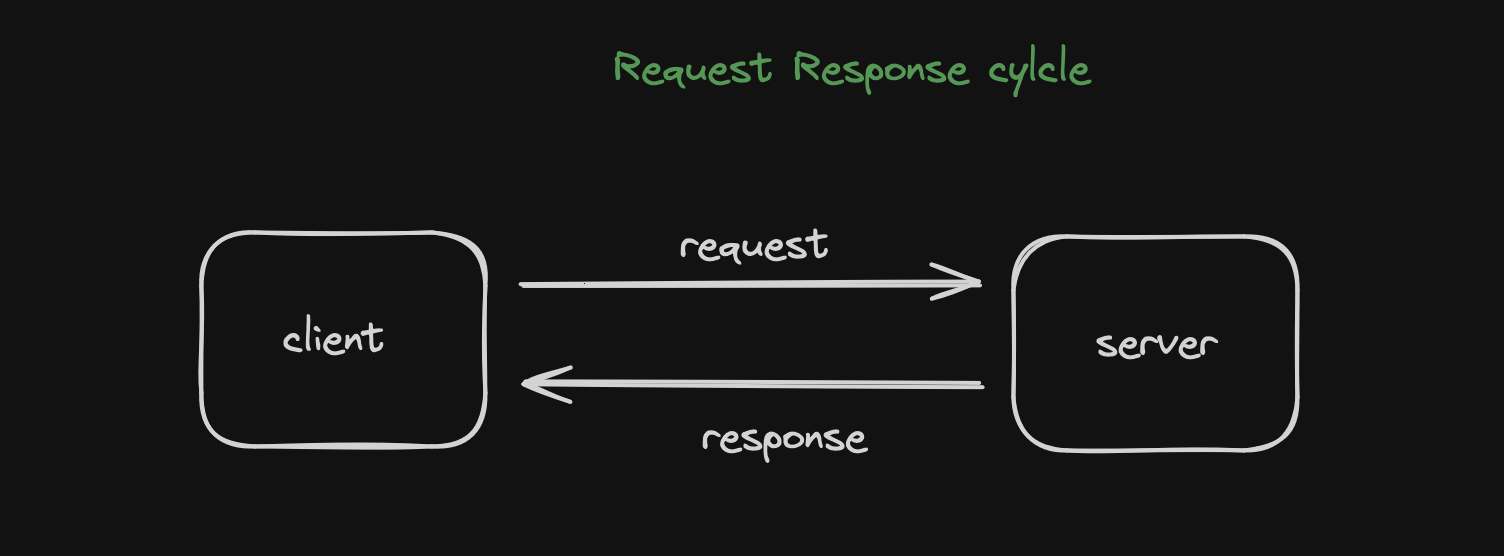
client sends a request
Server parses the request
Server processes the request (means make it understandable for the language )
Server sends a response
Client parses the response and consume
Where it’s being used?
Web, HTTP, DNS, SSH
RPC (remote procedure call)
SQL and Database protocols
APIs (Rest, Soap, GraphQl)
Anatomy of a Request / Response
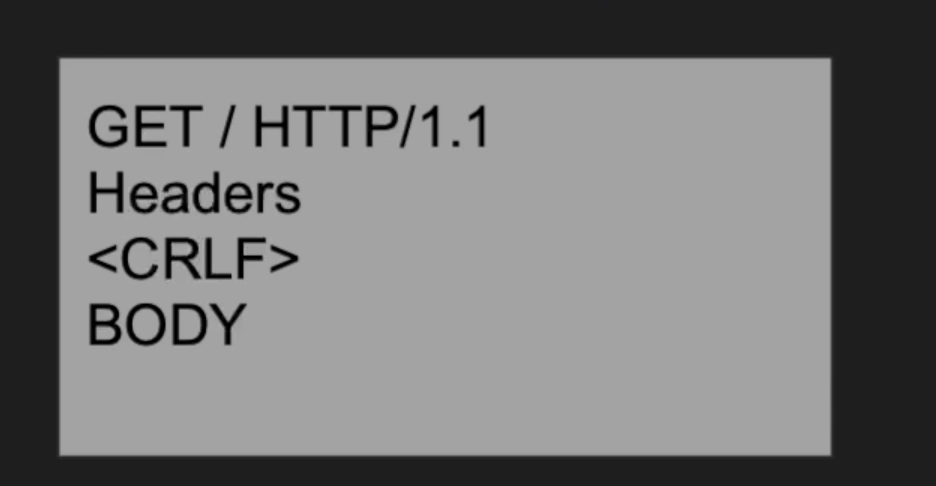
A request structure defined by both client and server
Request has a boundary
Defined by protocols and message format
Same for the response
Eg . HTTP Request
Doesn’t work everywhere
Notification service
The client has to request every time, is there any notification received? it will overload the server with a bunch of requests therefore not ideal.
Chatting application
The client has to ask the server again if any new message is received, again and again, the same problem.
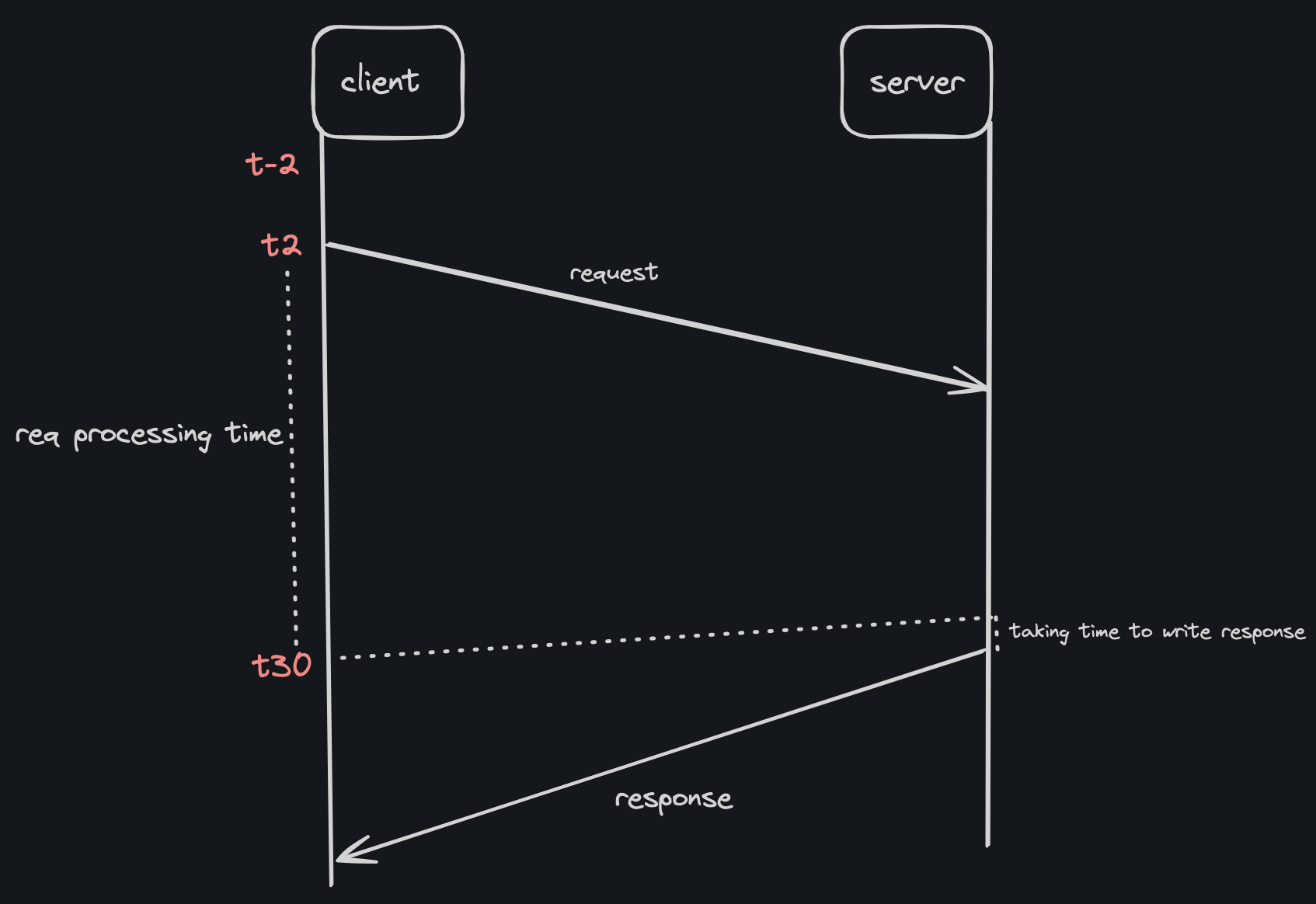
Very long request
What if the client disconnects? Then, we will lose our beautiful response.
// Backend (server.js using Express.js)
const express = require('express');
const app = express();
const port = 3000;

app.use(express.json());

app.get('/api/message', (req, res) => {
  res.json({ message: 'Hello from the backend!' });
});

app.post('/api/echo', (req, res) => {
  const { input } = req.body;
  res.json({ echoed: input });
});

app.listen(port, () => {
  console.log(`Server is running on http://localhost:${port}`);
});

// Frontend (client.js using Fetch API)
const getMessage = async () => {
  const response = await fetch('http://localhost:3000/api/message');
  const data = await response.json();
  console.log(data.message);
};

const postEcho = async (input) => {
  const response = await fetch('http://localhost:3000/api/echo', {
    method: 'POST',
    headers: {
      'Content-Type': 'application/json'
    },
    body: JSON.stringify({ input })
  });
  const data = await response.json();
  console.log(data.echoed);
};

// Usage example
getMessage(); // Should log: Hello from the backend!
postEcho('Hello, world!'); // Should log: Hello, world!
Synchronous and Asynchronous
synchronous which is in sync and asynchronous which is not in sync. (Can I work while watching TV?)
Synchronous IO
Caller sends a request and block
The caller cannot execute any call meanwhile
The receiver responds, caller unblocks
Caller and receiver are in sync
Asynchronous IO
Caller sends a request
The caller can work until gets a response
Caller and receiver are not necessarily in sync
// synchronous code
console.log("1")

for(let i =0:i<10000000000;i++){
console.log(i)
}

console.log("2")

// async code
console.log("1")

setTimeout(()=>{
for(let i =0:i<10000000000;i++){
console.log(i)
},1000
}

console.log("2")
PUSH
I want it as soon as possible
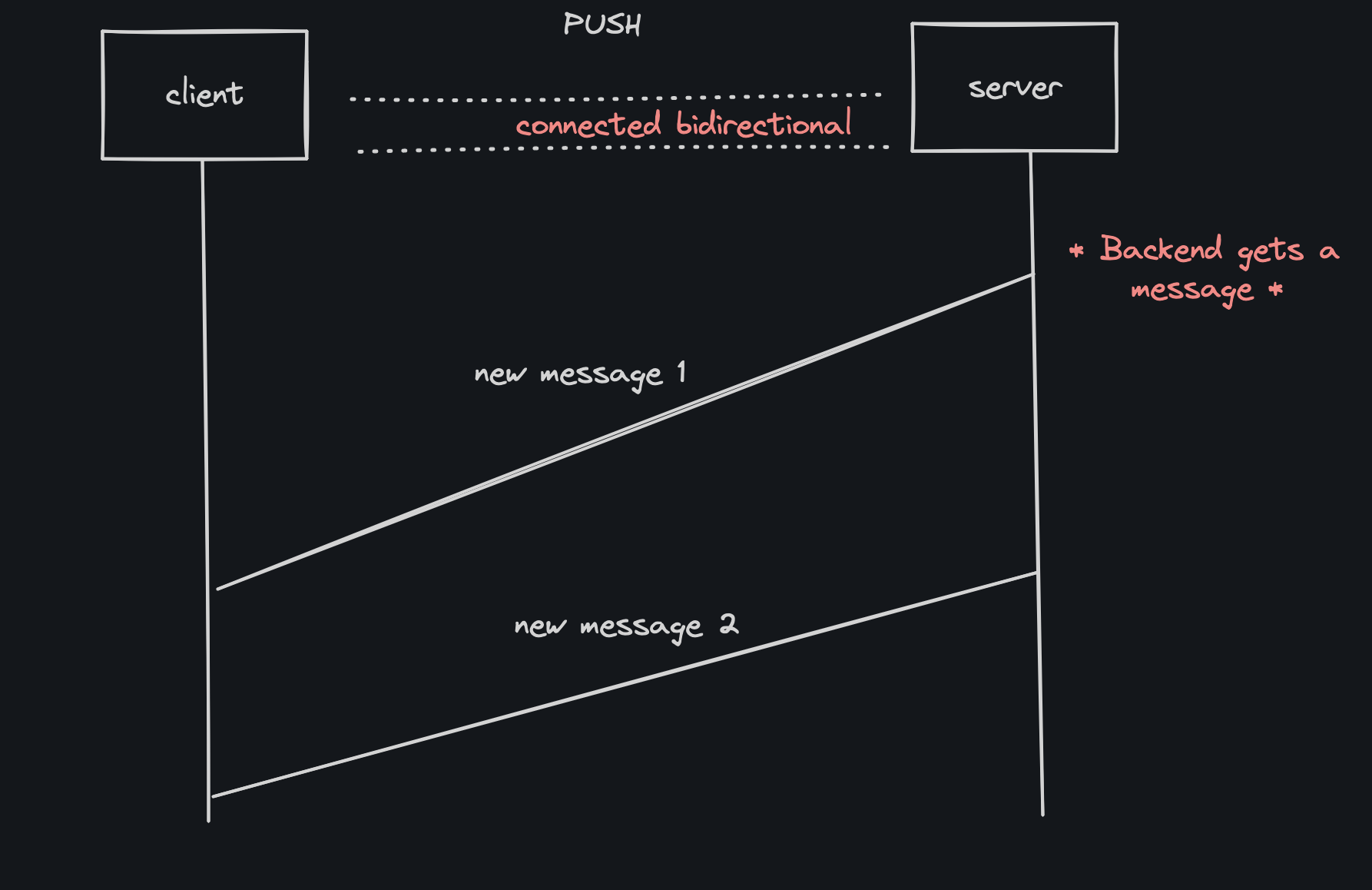
Client connects to a server
Server sends data to the client
Client doesn’t have to request anything
Protocol must be bidirectional
Used by RabbitMQ (it pushes to the client as soon as it receives the message)
we can understand this by the example of a chatting application. As soon as the server gets a message from another user it pushes that message to all connected clients to the server.
PROS
- Real-time (push as soon as get the answer)
CONS
The client must be online
Clients might not be able to handle
Requires a bidirectional protocol
Polling is preferred for light clients
const http = require("http");
const WebSocketServer = require("websocket").server
let connections = [];

//create a raw http server (this will help us create the TCP which will then pass to the websocket to do the job)
const httpserver = http.createServer()

 //pass the httpserver object to the WebSocketServer library to do all the job, this class will override the req/res
const websocket = new WebSocketServer({"httpServer": httpserver })
//listen on the TCP socket
httpserver.listen(8080, () => console.log("My server is listening on port 8080"))


//when a legit websocket request comes listen to it and get the connection .. once you get a connection thats it!
websocket.on("request", request=> {

    const connection = request.accept(null, request.origin)
    connection.on("message", message => {
        //someone just sent a message tell everybody
        connections.forEach (c=> c.send(`User${connection.socket.remotePort} says: ${message.utf8Data}`))
    })

    connections.push(connection)
    //someone just connected, tell everybody
    connections.forEach (c=> c.send(`User${connection.socket.remotePort} just connected.`))

})


//client code
//let ws = new WebSocket("ws://localhost:8080");
//ws.onmessage = message => console.log(`Received: ${message.data}`);
//ws.send("Hello! I'm client")
SHORT POLLING
The request is taking a while, I’ll check with you later.
Where request/response isn’t ideal
A request takes a long time to process (Upload a YouTube video)
The backend wants to send a notification (A user just logged in)
Polling is a good communication style
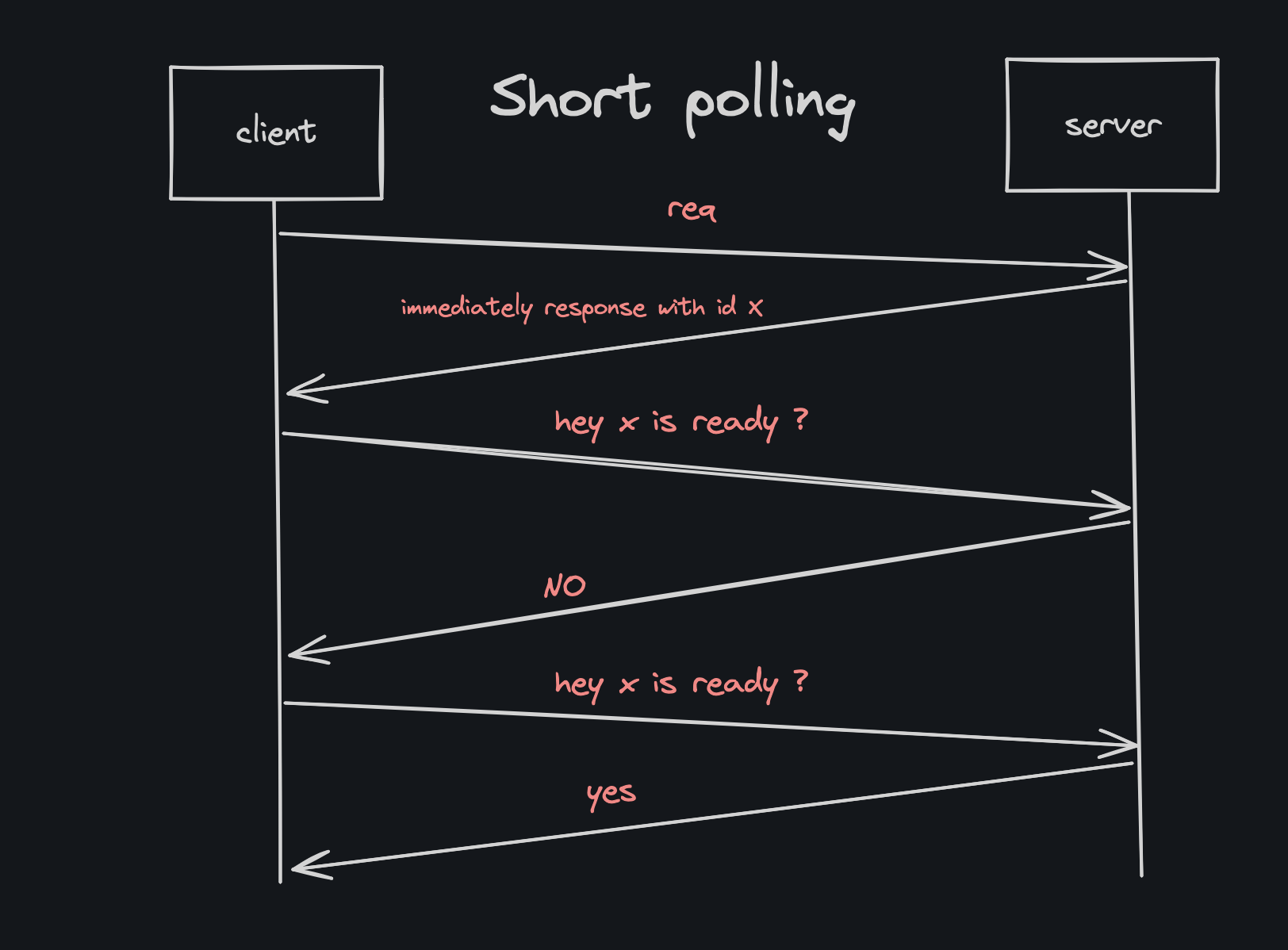
What is short polling?
The client sends a request
The server responds immediately with a handle(id)
The server continues to process the request
The client uses that handle to check for status
Multiple short request responses for polls
NOTE: In the case of PUSH, it sends the response as soon as the response arrives which can lead to loss of response if the client is disconnected. But In short polling, it will only send the response when the client asks for it. Otherwise, it won’t send it.
PROS
Simple
Good for long-running request
Client can disconnect
CONS
Too chatty
Network bandwidth
Wasted backend resource
const app = require("express")();
const jobs = {}

app.post("/submit", (req, res) =>  {
    const jobId = `job:${Date.now()}`
    jobs[jobId] = 0;
    updateJob(jobId,0);
    res.end("\n\n" + jobId + "\n\n");
})

app.get("/checkstatus", (req, res) => {
    console.log(jobs[req.query.jobId])
    res.end("\n\nJobStatus: " + jobs[req.query.jobId] + "%\n\n")

} )

app.listen(8080, () => console.log("listening on 8080"));

function updateJob(jobId, prg) {
    jobs[jobId] = prg;
    console.log(`updated ${jobId} to ${prg}`)
    if (prg == 100) return;
    this.setTimeout(()=> updateJob(jobId, prg + 10), 3000)
}
LONG POLLING
The request is taking a long time, I’ll check with you later But talk to me only when it’s ready(KAFKA).
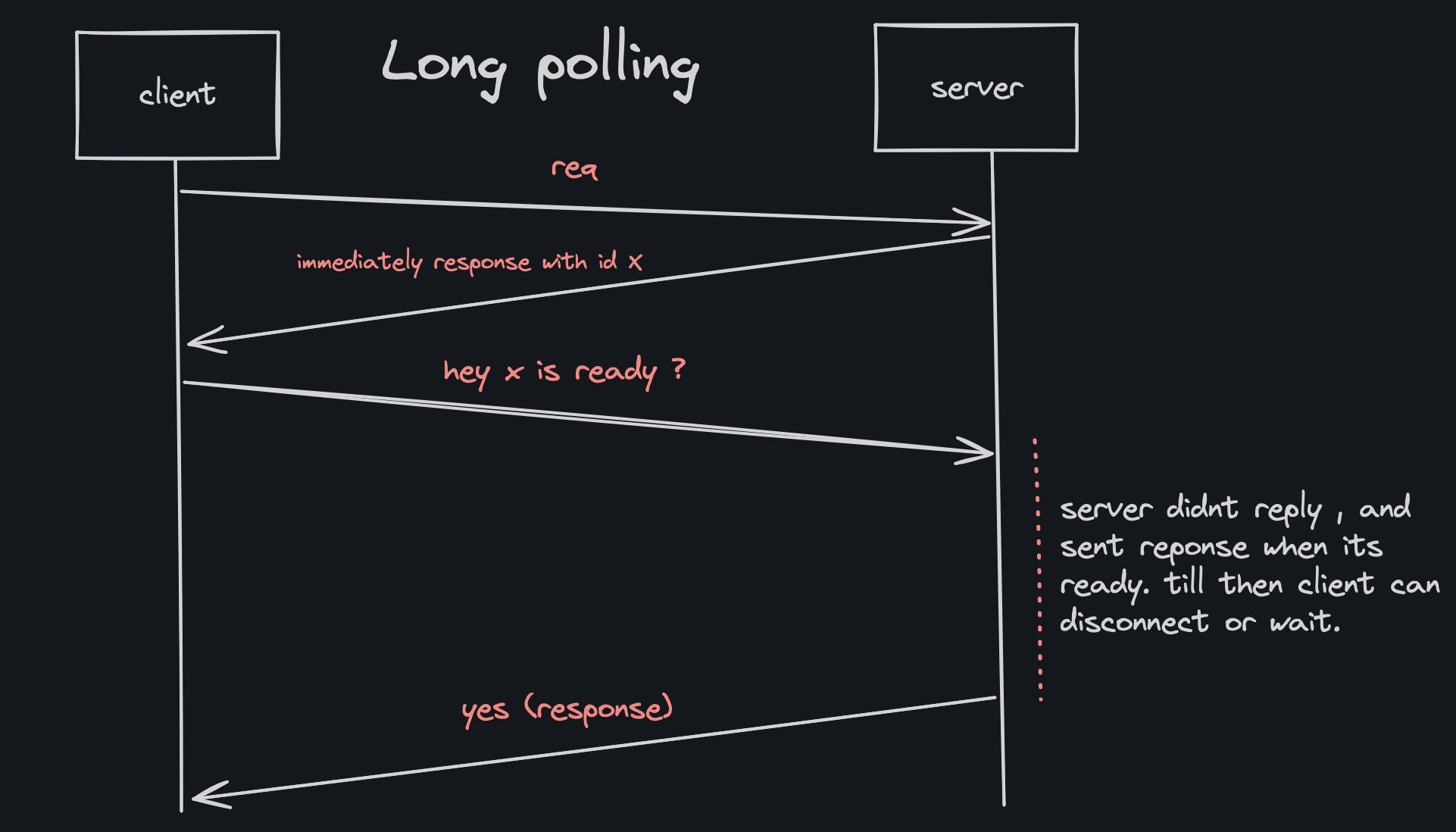
What is long polling?
The client sends a request
The server responds immediately with a handle(id)
The server continues to process the request
The client uses the handle to check the status
The server doesn’t reply until it has the response
So we got a handle, we can disconnect a server. We are less chatty.
Some variation has a timeout too
what I mean is, after getting the handle whenever we try to ask the server for a response if it is not ready it will not send any response which lead to the client being idle but instead of waiting client can disconnect because it has the handle and request anytime later.
PROS
Less chatty and backend-friendly
The client can still disconnect
CONS
- Not real time
const app = require("express")();
const jobs = {}

app.post("/submit", (req, res) =>  {
    const jobId = `job:${Date.now()}`
    jobs[jobId] = 0;
    updateJob(jobId,0);
    res.end("\n\n" + jobId + "\n\n");
})

app.get("/checkstatus", async (req, res) => {
    console.log(jobs[req.query.jobId])
    //long polling, don't respond until done
    while(await checkJobComplete(req.query.jobId) == false);
    res.end("\n\nJobStatus: Complete " + jobs[req.query.jobId] + "%\n\n")

} )

app.listen(8080, () => console.log("listening on 8080"));

async function checkJobComplete(jobId) {
    return new Promise( (resolve, reject) => {
        if (jobs[jobId] < 100)
            this.setTimeout(()=> resolve(false),  1000);
        else
            resolve(true);
    })

}

function updateJob(jobId, prg) {
    jobs[jobId] = prg;
    console.log(`updated ${jobId} to ${prg}`)
    if (prg == 100) return;
    this.setTimeout(()=> updateJob(jobId, prg + 10), 10000)
}
SERVER SENT EVENTS
one request , a very very long response
Limitation of request/response
Vanilla Request/response isn’t ideal for notification backend
The client wants real-time notification from the backend - A user just logged in
Push works but restrictive
Server-sent events work with request/response
Designed for HTTP
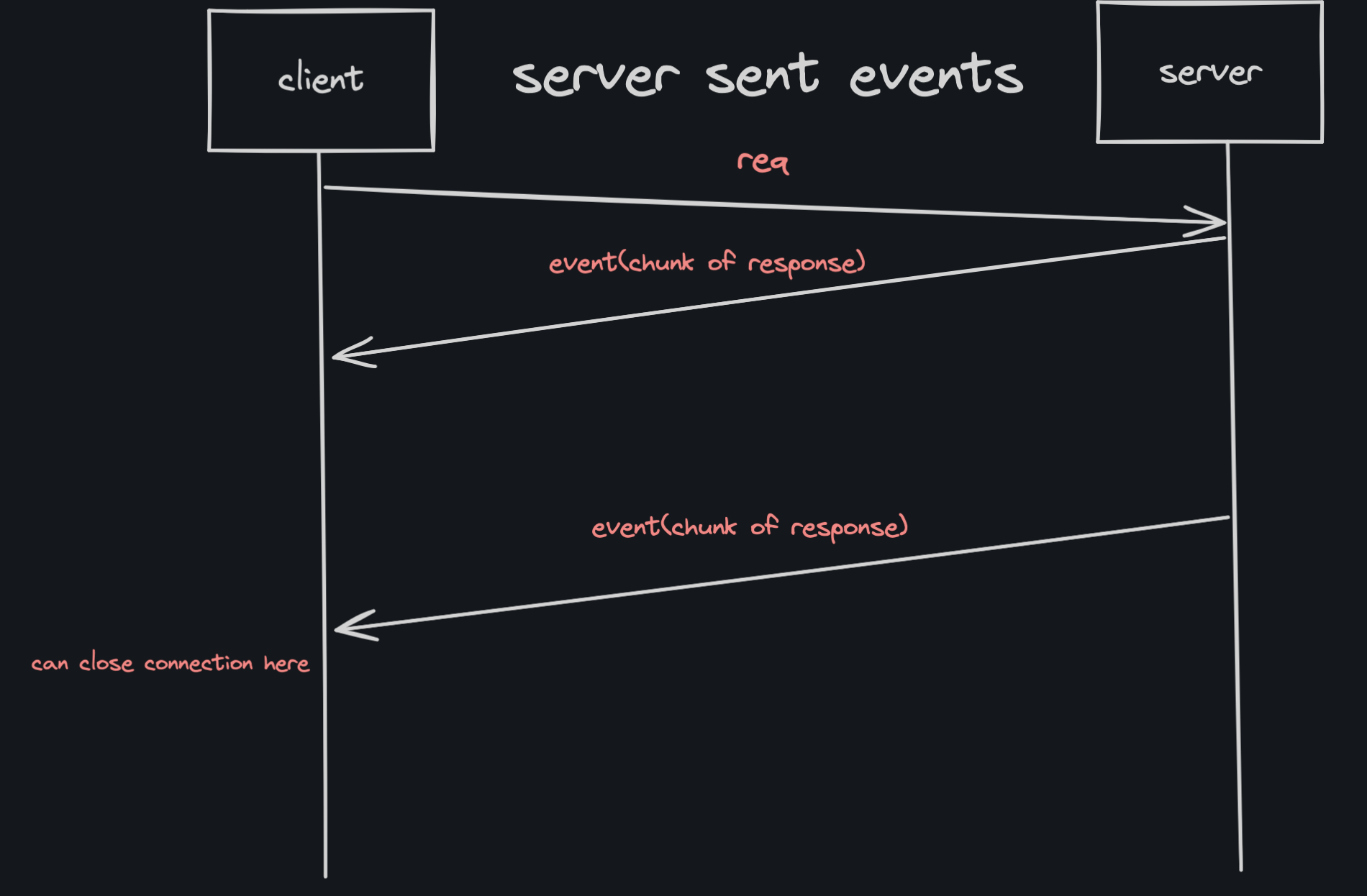
What is server sent events?
A response has a start and end
Client sends a request
Server sends logical events as part of response
Server never writes the end of the response
It is still a request but an unending response
Client parses the streams data looking for events
Works with req/res (HTTP)
PROS
Real Time
Compatible with req/res
CONS
Client must be online
Client might not be able to handle
Polling is preferred for light clients
HTTP 1.1 problem (6 connections)
/* Client Code

let sse = new EventSource("http://localhost:8080/stream");
sse.onmessage = console.log

*/

const app = require("express")();

app.get("/", (req, res) => res.send("hello!"));

app.get("/stream", (req,res) => {

    res.setHeader("Content-Type", "text/event-stream");
    send(res);

})
const port = process.env.PORT || 8888;

let i = 0;
function send (res) {

    res.write("data: " + `hello from server ---- [${i++}]\n\n`);


    setTimeout(() => send(res), 1000);
}

app.listen(port)
console.log(`Listening on ${port}`)
PUBLISH / SUBSCRIBE
one publishes many readers
PROS
Scales w/ multiple servers
Great for microservices
Loose coupling
Works while the client not running
Cons
Message delivery issue (two general problems)
Complexity
Network saturation
// publisher.js

/* RabbitMQ */

const amqp = require("amqplib");

const msg = {number: process.argv[2]}
connect();
async function connect() {

    try {
        const amqpServer = "amqp://localhost:5672"
        const connection = await amqp.connect(amqpServer)
        const channel = await connection.createChannel();
        await channel.assertQueue("jobs");
        await channel.sendToQueue("jobs", Buffer.from(JSON.stringify(msg)))
        console.log(`Job sent successfully ${msg.number}`);
        await channel.close();
        await connection.close();
    }
    catch (ex){
        console.error(ex)
    }

}
// consumer.js

const amqp = require("amqplib");

connect();
async function connect() {

    try {
        const amqpServer = "amqp://localhost:5672"
        const connection = await amqp.connect(amqpServer)
        const channel = await connection.createChannel();
        await channel.assertQueue("jobs");

        channel.consume("jobs", message => {
            const input = JSON.parse(message.content.toString());
            console.log(`Recieved job with input ${input.number}`)
            //"7" == 7 true
            //"7" === 7 false

            if (input.number == 7 )
                channel.ack(message);
        })

        console.log("Waiting for messages...")

    }
    catch (ex){
        console.error(ex)
    }

}

